


RillStory
4.5338.00 Reviews
App Specs
- Version
- 5.4.0
- Updated On
- License
- Free
- Downloads
- 100,000+
- Developer
- CANTREE PUBLISHING LIMITED
- Categories
- Books & Reference
- Platform
- Android
Screenshots
 Analysis by AppCompare
I judge a story app by whether it helps me settle into a good read without making every spare moment feel like a hunt for the right title. RillStory is a free reading app from CANTREE PUBLISHING LIMITED, and its central appeal is the chance to read stories that let you influence what happens next. That choice-based approach gives a familiar pastime a more hands-on feel, though it will not suit every reader.
It sits in the books and reference category, but I would think of it less as a replacement for a conventional ebook shelf and more as a place to explore serialized, interactive fiction. The distinction matters: if you want a quiet, linear novel from a specific author, a standard ebook app may be a better fit. If you enjoy wondering how a different decision might change a scene, this format has more to offer.
Stories that invite a decision
I find that the most useful way to approach this section is to treat each choice as a small pause for interpretation, not a test with a right answer. That makes the reading feel more personal while helping me notice what the story is asking me to value. The next section looks at how that decision-making changes the rhythm of an ordinary reading session.
Why interactive reading is the main draw
The most distinctive idea here is choosing within a story rather than only following a fixed sequence of events. That small change can make reading feel more personal: I am not just watching a character face a dilemma; I am deciding which direction the narrative takes. It can also make a story worth revisiting, since a different choice may lead me to consider another path.
That does not mean every reader will want to treat fiction like a puzzle. Sometimes I would rather follow an author’s intended arc without stopping to weigh options. Interactive stories work best when the choices feel meaningful and fit the scene, not when I am looking for a single “correct” answer. I would approach the format as a different kind of reading, not a guaranteed upgrade over a conventional book.
How I would fit it into an ordinary day
For a short break, I would open a story and read until I reached a natural pause, rather than starting something that needs a long, uninterrupted session. A commute or a quiet wait can suit this style particularly well: a decision gives me a reason to pay attention, while the next stretch of reading can wait until I have time again. If I am tired or distracted, though, a linear book may be easier to dip in and out of.
A useful habit with branching fiction is to slow down at a choice. I would read the surrounding scene carefully, decide what makes sense for the character, and accept the outcome instead of restarting immediately to chase a preferred result. That keeps the story feeling like a narrative rather than a checklist. If I do want to explore alternate directions, I would save that for a second read rather than interrupting the first one.
Worth Reading Before You Choose

Flipboard Shows What News Apps Must Do Beyond the Feed

Switching to Android Auto Means Rethinking Your Driving Routine

Google Calendar Makes a Crowded Week Easier to Manage

Ludo King Makes the Most of the Minutes Between Plans

Baby Panda World Brings Quick Play to Modern Phones, but Its Game Library Feels Busy

ESPN’s Live Game View Makes Following Close Games Easier
Reader feedback can help when I am unsure whether a story’s tone or premise is for me, but I would use discussion as a clue, not a substitute for trying a few pages. Other readers may enjoy the very choices I find frustrating. Keeping that in mind makes recommendations and community conversation more useful without letting them decide my taste for me.
What to expect from the reading routine
Reading apps are most useful when they make it easy to return to a book after a gap. Here, the interactive format gives me a practical reason to remember where I left off: I may want to see how the next scene responds to my last decision. If I am reading several stories at once, I would keep my choices deliberate and avoid opening too many new ones at once; otherwise, it is easy to forget which characters and dilemmas belong to which plot.
For a reader deciding whether the format is worth trying, the simplest test is to start with a premise that already sounds appealing. The branching element can add interest, but it cannot rescue a story whose characters or subject do not hold my attention. I would give one story enough time to reach a choice and see whether making that decision feels enjoyable, rather than judging the whole app from its first screen.
Who is likely to enjoy it
I think this approach is strongest for readers who like character dilemmas, alternate outcomes, and fiction that gives them a little agency. It may also suit someone who wants a lighter, more active alternative to scrolling through unrelated posts during a break. People who write fiction might find the act of following different narrative routes interesting as a reader, but I would not assume that reading and publishing tools alone make it a substitute for a dedicated writing platform.
On the other hand, I would skip it if I mainly want a carefully curated collection of well-known print books, a straightforward library for books I already own, or a reading experience with no decisions built into the plot. Those needs are better served by conventional ebook and library apps. The choice-based premise is the reason to try this one, not a feature every reader should feel obliged to enjoy.
First Impressions
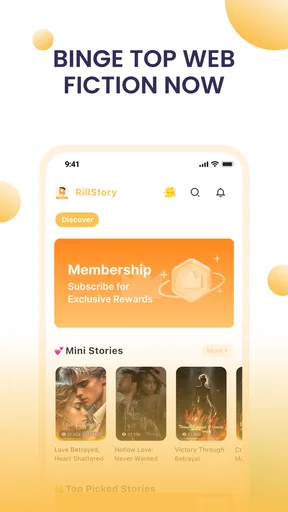
Upon opening the app, you’re greeted with a clean and intuitive interface. It’s not cluttered, which is a relief because, let’s be honest, some apps can feel like navigating a maze of options. Here, everything is laid out simply, with easy access to different story genres. The design is sleek, with a soothing color palette that makes reading for extended periods a pleasant experience.
Diving Into the Features
Okay, let’s talk features. The app doesn’t just throw a bunch of stories at you and call it a day. No, it allows you to personalize your reading experience in ways that make you feel like the stories were crafted just for you. You can choose from a variety of genres, and there’s even a recommendation algorithm that learns what you like. It’s like having a personal librarian who knows your taste better than you do!
One of the coolest features I stumbled upon was the interactive storytelling element. Imagine being able to make choices within stories that change the narrative outcome. It’s like those choose-your-own-adventure books we loved as kids, but upgraded for the digital age. This feature keeps you engaged and makes the stories feel alive.
Community and Connectivity
What’s storytelling without a bit of community spirit, right? The app offers a platform where readers can connect, discuss, and even collaborate on stories. It’s a space that fosters creativity and interaction among users. I found the forums to be lively, with discussions ranging from plot theories to writing tips. It’s like a book club that never sleeps!
The app also allows aspiring writers to publish their own stories. So, if you’ve got a tale brewing in your mind, this could be your chance to share it with the world. The feedback system is friendly and constructive, making it a nurturing space for budding authors.
The Reading Experience
Now, let’s chat about the actual reading experience. The text is crisp and easy to read, with adjustable font sizes and background colors to suit your preferences. There’s even a night mode for those late-night reading marathons. And speaking of marathons, the app has a feature that tracks your reading progress and even sets reading goals. It’s a neat way to stay motivated and keep the pages turning.
Another nifty feature is the offline reading mode. You can download stories to read on the go, perfect for when you’re stuck in a no-Wi-Fi zone. Trust me, this feature is a lifesaver during long commutes or flights.
A Few Quirks
No app is without its quirks, and the reading experience is no exception. Occasionally, I found the app to lag a bit when loading longer stories, especially with a lot of media content. However, it’s not a deal-breaker, and the developers seem committed to ironing out these kinks with regular updates.
Another point to note is the in-app purchases for premium content. While there’s a wealth of free stories, some of the more intriguing titles require a purchase. It’s a common model, but something to keep in mind if you’re looking to dive fully into the premium offerings. The app is free to download, while optional purchases range from about fifteen dollars to two hundred dollars per item, so I would check the cost of a specific offering before committing. That spread makes it especially important to distinguish casual browsing from a purchase you genuinely want.
Practical trade-offs before you settle in
Stories that mix text with media can take longer to load, so I would avoid relying on a long, media-heavy chapter when I have only a few minutes or an unreliable connection. Downloading something in advance is the safer choice for travel, while choosing a shorter reading session is sensible if I am on a tight schedule. Offline access helps with connectivity, but it does not remove the need to plan ahead.
The interactive format also changes how I think about reading progress. A goal can encourage a steady routine, but a daily target is not automatically useful if the story’s choices make me want to pause and think. I would set a modest goal that fits my actual free time, rather than treating a missed session as failure. The point is to enjoy the story, not turn leisure into another task to complete.
When choosing between this and a standard ebook app, I would ask what I want from the next reading session. For a familiar, continuous narrative or a title I already own, a traditional reader is usually more direct. For fiction where my decisions are part of the appeal, this app has a clearer reason to be on my phone. It is a trade-off between breadth and predictability on one side, and participation on the other.
Age, cost, and a sensible first try
The app is rated Teen, which is a useful signal for families, but I would still look at the themes of an individual story before handing it to a younger reader. A broad age label cannot tell me whether a particular plot suits someone’s tastes or sensitivities. For parents, the practical approach is to browse together and talk about the kinds of stories and decisions that feel appropriate.
With an average rating of 3.8 from around 3,800 ratings, it appears to have a mixed but substantial audience. It has more than 50,000 installs, and its current version is 5.1.0; it was released on May 19, 2025. Those figures offer context, not a promise that every story or feature will suit me. The minimum operating system is version 7.0, so I would check compatibility before installing on an older device.
My low-risk way to try it would be to begin with free reading, explore a genre I already like, and see whether the first meaningful choice makes me more invested or simply interrupts the flow. If I enjoy that moment of deciding, then the app’s central idea is working for me. If I keep wishing the story would just continue, that is a clear sign that a regular ebook reader may be a better use of my time.
Final Thoughts
All in all, this is a delightful app for anyone who loves getting lost in a good story. Its user-friendly design, interactive features, and vibrant community make it a standout in the world of storytelling apps. Whether you’re a reader or a writer, there’s something here for you.
If you’re looking to explore new narratives or share your own, give RillStory a try. It’s like having a library in your pocket, ready to whisk you away into a world of imagination anytime you need it. Happy reading!
Pros
- User-friendly interface with intuitive navigation.
- Rich library of interactive storytelling content.
- Offline access for reading on the go.
- Customizable reading settings for comfort.
- Engaging visuals enhance the reading experience.
Cons
- Limited free content; subscription needed.
- Occasional app crashes during updates.
- Battery consumption is slightly high.
- Some stories lack depth and variety.
- In-app purchases can be pricey.
FAQs for RillStory
What is RillStory and how does it work?
RillStory is an interactive storytelling app that lets users create and share their own stories using a variety of multimedia tools. Users can write narratives, add images, and include audio to bring stories to life. The app provides a platform for both amateur and professional storytellers to express creativity and connect with an audience.
Is RillStory available for both Android and iOS devices?
Yes, RillStory is available for download on both Android and iOS platforms. The developers have ensured compatibility with a wide range of devices, making it accessible to most smartphone and tablet users. You can find it on the Google Play Store for Android devices and the App Store for iOS devices.
Does RillStory have any subscription fees or in-app purchases?
RillStory offers a free version with basic features, allowing users to create and share stories without any initial cost. However, there are optional in-app purchases and subscription plans that unlock premium features, such as advanced editing tools and exclusive content libraries, enhancing the storytelling experience.
Can I collaborate with other users on RillStory?
Yes, RillStory supports collaboration, allowing users to co-create stories with friends or other users. Collaborative features include shared editing capabilities and real-time updates, making it easier for multiple users to contribute to the same story. This fosters a community-driven environment and enhances creativity.
Is RillStory suitable for all age groups?
RillStory is designed to be user-friendly and suitable for a wide range of age groups. While the app includes features that appeal to both young and mature audiences, parental guidance is recommended for younger users due to the potential for interaction with other users and the variety of content that may be shared.


